Secure document workflows for clinical teams: 2026 guide
Secure document workflows for clinical teams are defined as structured, access-controlled processes that manage the creation, routing, storage, and disposal of patient records in full compliance with HIPAA and GDPR. Every clinical team handling protected health information (PHI) needs more than a shared folder and a password. The industry term for this practice is clinical records management, and the stakes are high. Mandatory technical controls include user authentication, role-based access, full audit trails, AES-256 encryption at rest, and TLS 1.2+ in transit. Tools like DocuWare, Certinal, and Razuna each address parts of this requirement, but no single platform replaces a well-designed internal policy.
1. What are the essential security features for clinical document workflows?
Five technical controls form the non-negotiable baseline for any compliant document management solution in a clinical setting. Miss one, and your organisation carries legal exposure regardless of what the software vendor claims.
Encryption at rest and in transit

AES-256 encryption protects stored files from unauthorised access. TLS 1.2+ protects data moving between systems, such as when a clinician uploads a referral letter or retrieves a discharge summary. Both must be active simultaneously. One without the other leaves a gap.
Role-based access controls
Every staff member should access only the records their clinical role requires. A receptionist does not need the same file permissions as a consultant. Permissions mapped to functional roles rather than job titles give you finer control and reduce the blast radius of any single compromised account.
Comprehensive audit trails
Audit trails must log every action: who viewed a file, who edited it, who attempted to delete it, and when. Deletion logging is particularly important. Many systems record creation and access but skip deletion events. That gap becomes a liability during a regulatory investigation.
Business Associate Agreements
A Business Associate Agreement (BAA) is a legally binding contract between your organisation and any vendor who handles PHI on your behalf. Signed BAAs with vendors are not optional. Having a feature list that mentions “HIPAA compliance” is not the same as a signed agreement. Without one, your organisation bears full liability for a vendor’s breach.
Retention policies aligned with six-year standards
HIPAA compliance requires retaining compliance-related records for at least six years from creation or last action. Your document management solution must enforce this automatically, not rely on staff remembering to archive files manually.
Pro Tip: Review your vendor’s BAA annually. Vendors update their sub-processors, and a BAA signed in 2023 may no longer cover all the third parties handling your data in 2026.
2. Which tools offer the best features for clinical teams?
The market for clinical document management solutions is crowded, but a handful of platforms stand out for clinical environments specifically. Here is a direct comparison of the leading options.
| Tool | Key strength | HIPAA BAA available | Best for |
|---|---|---|---|
| DocuWare | Automated indexing and EHR integration | Yes | Mid-size practices |
| Certinal | eSignature with compliance audit trails | Yes | Signature-heavy workflows |
| Razuna | AI metadata extraction and asset management | Varies by plan | Document-heavy teams |
| SimpleFile | Scan-to-signature workflow automation | Yes | Small clinical teams |
| Docpolish | Client-side PII anonymisation before AI processing | Yes | Privacy-first document polishing |
DocuWare connects directly with electronic health record (EHR) systems and automates document indexing on capture. That matters because documentation indexed at capture enables rapid audit responses rather than frantic manual searches.
Certinal focuses on the signature stage of clinical workflows. It provides a full audit trail for every signed document, which is critical for consent forms, referral authorisations, and treatment plans.
Razuna uses AI to extract metadata from uploaded documents. For teams managing large volumes of imaging reports or lab results, this reduces the manual classification burden significantly.
SimpleFile is built around the scan-to-signature journey. Automated signing within platforms eliminates the manual export and re-upload steps that create PHI leakage risks. For teams under 50 staff, this is often the most practical choice.
Docpolish takes a different approach. It detects and anonymises personally identifiable information on the client side, inside the user’s browser, before sending any document to an AI engine for polishing. The original PII is restored in the final output. No raw patient data ever leaves the user’s device. Every processed document receives a trust identifier, creating an automatic audit trail. For clinical teams that use AI writing tools to polish clinical correspondence, Docpolish removes the privacy risk entirely.
Pro Tip: Before trialling any platform, ask the vendor directly: “Can you provide a signed BAA before we upload any test data?” A vendor who hesitates is a vendor to avoid.
3. How do secure workflows improve collaboration and patient privacy?
Clinical team collaboration breaks down when document security is treated as an IT concern rather than a workflow design principle. The two are inseparable.
Role-based access mirrors clinical responsibility
When a nurse can only access the ward records relevant to their shift, and a consultant can access the full patient history, the workflow reflects real clinical accountability. This structure reduces the risk of accidental disclosure and makes it easier to trace any anomaly back to a specific action.
Reducing manual handoffs
Security risks peak during document transfers between departments. A paper referral passed between reception and a specialist, or a PDF emailed between systems, creates an uncontrolled copy of PHI. Secure portals that route documents internally, without creating external copies, close this gap.
Replacing shared folders and email
Shared network drives and email attachments are the two most common sources of uncontrolled PHI in clinical settings. Neither provides access logging, version control, or automatic retention enforcement. Replacing them with a structured document management solution is the single highest-impact change most small clinical teams can make.
Consider a practical example. A patient is referred from a GP practice to a specialist clinic. Under an uncontrolled workflow, the referral letter is emailed as an attachment, printed at the clinic, scanned into a local folder, and then emailed again to the consultant. Each step creates a new uncontrolled copy. Under a secure workflow, the GP uploads the referral to a shared portal, the clinic receives a notification, the consultant accesses the document directly, signs off electronically, and the audit trail records every action. No uncontrolled copies exist at any point.
4. What are the practical steps to implement secure workflows?
Implementation does not require a large IT team or a six-month project. For most clinical teams, the following steps cover the essentials.
- Map your current document journey. List every document type your team handles, from patient intake forms to discharge letters, and identify where each one is created, stored, and eventually disposed of. You cannot secure a workflow you have not mapped.
- Choose a linear routing system for smaller teams. Simple linear routing suits practices with fewer than 50 staff. Complex branching workflows add overhead without proportional security benefit at that scale.
- Assign permissions by function, not hierarchy. A senior administrator does not automatically need access to clinical records. Map each permission to the specific task that requires it.
- Obtain signed BAAs from every vendor. This includes your document management platform, your eSignature provider, your cloud storage provider, and any AI tool used to process clinical text. Legal exposure remains without formal agreements, regardless of how secure the platform appears.
- Document your internal policies. HIPAA compliance requires active policies, not just compliant software. Write down your access policy, your retention schedule, and your breach response procedure. Review them annually.
- Train staff on the specific risks. Clinical staff need to understand why they cannot email a patient record to a personal address, not just that they cannot. Context drives compliance. Training should cover phishing awareness, password hygiene, and the correct use of your chosen platform.
- Audit access logs quarterly. Pull a report of who accessed which records and look for anomalies. Automated alerts for unusual access patterns are available in most enterprise-grade platforms and worth enabling from day one.
For teams exploring secure sharing compliance across regulated industries, the same principles apply whether the context is healthcare, legal, or finance.
5. How does automated PHI detection change the picture?
Manual review of documents for PHI is not feasible at scale. A busy clinical team might process hundreds of documents per week. Reviewing each one manually for sensitive data before it is shared or processed externally is neither practical nor reliable.
Top document management systems identify PHI automatically and flag documents for special handling. This capability shifts the burden from individual staff members to the system itself. The result is consistent protection regardless of which team member is handling a document on a given day.
Docpolish applies this principle specifically to AI-assisted document polishing. Before any clinical correspondence is sent to an AI engine for grammar or style improvements, Docpolish detects and removes PII on the client side. The AI never sees the patient’s name, date of birth, or NHS number. After processing, the original data is restored. This means clinical teams can use AI writing tools without creating a GDPR or HIPAA liability.
The broader implication is significant. As AI tools become standard in clinical administration, the question is not whether to use them but how to use them without exposing patient data. Client-side anonymisation is the answer that regulators and compliance officers will increasingly expect to see documented.
Key takeaways
Secure document workflows for clinical teams require encryption, signed BAAs, role-based access, and active internal policies working together. Software alone does not produce compliance.
| Point | Details |
|---|---|
| Five core technical controls | AES-256 encryption, TLS 1.2+, role-based access, audit trails, and user authentication are all mandatory. |
| BAAs are legally binding requirements | Signed Business Associate Agreements with every vendor are required, not optional extras. |
| Manual handoffs are the highest risk | Document transfers between departments create the greatest PHI exposure; automate wherever possible. |
| Retention must be enforced automatically | Records must be retained for at least six years; manual archiving is unreliable at scale. |
| Policy and training drive real compliance | Compliant software without documented internal policies and trained staff does not satisfy HIPAA. |
Why most clinical teams are still one shared folder away from a breach
I have reviewed document workflows across a range of clinical settings, and the pattern is almost always the same. The software is reasonably secure. The policies are written down somewhere. The problem is the gap between the two.
Staff use a shared drive because the official system is slower. A locum sends a referral by email because they do not have portal access yet. A manager exports a report to their desktop to format it, then forgets to delete the local copy. None of these actions are malicious. All of them create real exposure.
The uncomfortable truth is that documentation treated as operational records, indexed and classified from the moment of capture, is the only reliable defence. Filing things properly is not a bureaucratic nicety. It is what makes an audit survivable and a breach containable.
I am also sceptical of any clinical team that treats compliance as a one-time implementation project. The threat environment changes. Staff turn over. Vendors update their sub-processors. The teams that stay genuinely compliant are the ones that audit their own access logs, review their BAAs annually, and treat security training as a recurring obligation rather than an onboarding checkbox.
For teams considering AI tools in clinical administration, the question of where patient data goes during processing is not a theoretical concern. It is a live regulatory question. Client-side anonymisation, as Docpolish implements it, is the only approach I have seen that genuinely removes the risk rather than managing it after the fact. That distinction matters when you are the one signing the compliance declaration.
How Docpolish protects clinical documents at the point of processing
Clinical teams that use AI tools to polish correspondence, reports, or referral letters face a specific risk: patient data entering an external AI system without explicit consent or a signed BAA.
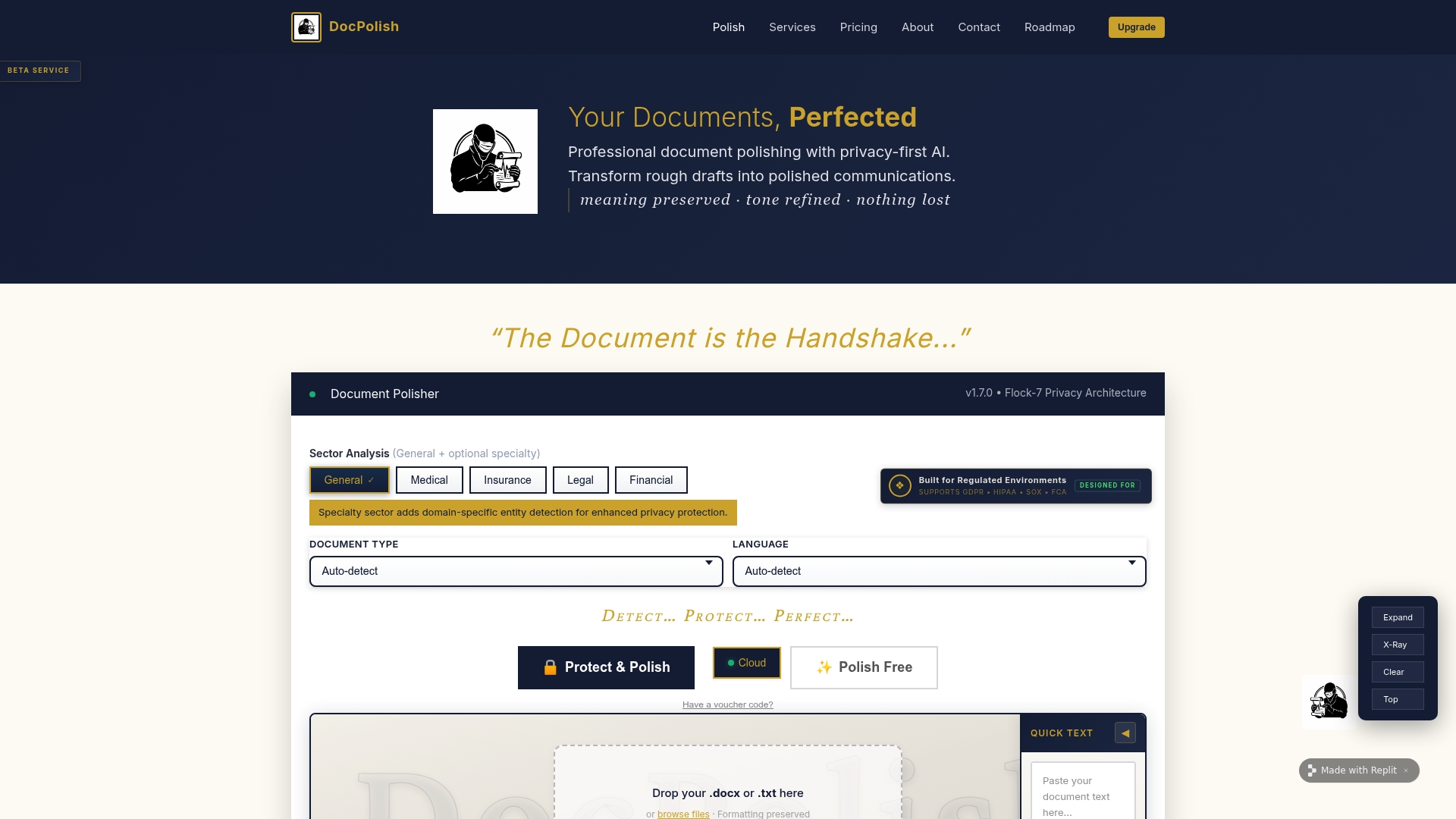
Docpolish resolves this at the source. Its client-side PII detection anonymises patient data inside the user’s browser before any content reaches an AI engine. The polished document is returned with the original data restored, and every processed file receives a trust identifier for your audit trail. For clinical teams that need compliant document handling without sacrificing the efficiency of AI-assisted writing, Docpolish is built precisely for that requirement. You can also explore clinical confidentiality guidance to understand the regulatory context in full before you begin.
FAQ
What encryption standard is required for clinical document workflows?
AES-256 encryption at rest and TLS 1.2+ in transit are the required standards for HIPAA-compliant document management systems. Both must be active simultaneously to meet regulatory expectations.
Do I need a BAA with every software vendor I use?
Yes. Any vendor that processes, stores, or transmits PHI on your behalf requires a signed Business Associate Agreement. This includes cloud storage providers, eSignature tools, and AI writing platforms.
How long must clinical records be retained under HIPAA?
HIPAA compliance requires retaining compliance-related records for a minimum of six years from the date of creation or the date they were last in effect. Automated retention enforcement within your document management system is the most reliable way to meet this requirement.
What is the biggest security risk in a clinical document workflow?
The greatest vulnerability occurs during document transfers between departments, where visibility and ownership can be lost. Automating handoffs within a secure platform, rather than relying on email or manual copying, is the most direct way to reduce this risk.
Can clinical teams use AI tools without breaching patient privacy?
Yes, provided the AI tool anonymises patient data before processing. Docpolish uses client-side PII detection to remove identifiable information before any document reaches an AI engine, then restores the original data in the final output, keeping patient privacy intact throughout.